


This Friday (04/12/13), I am leading an hour long Lunch & Learn session going over the basics of PowerShell. A question I consistently see is, “I am new to PowerShell. What do I need to do first?” Here are the two first things you should do:
Finding the Technical Needle in the Proverbial Haystack (Part 3)
Wrapping up our series on finding technical information quickly, we are going to explore the Group Policy Search service a little bit more. With over 3400 policy settings that can be configured in multiple ways, finding (and understanding) that perfect setting can be a challenge. Because you will likely be hunting these settings in Group Policy Management Console (GPMC), we are going to add a search option that links us back to the Group Policy Search service.
Finding the Technical Needle in the Proverbial Haystack (Part 2)
In Part 1 of our Haystack series, we looked at two ways to search TechNet and the Azure App, Group Policy Search. Today, we are going to cover a way to improve the Group Policy Search service and to make it accessible in Windows Explorer.
Finding the Technical Needle in the Proverbial Haystack (Part 1)
There is a plethora of information in Active Directory and Group Policy. Every new release of Server simply compounds this information. 9 times out of 10, everything you will ever need is on TechNet. Finding it is the problem. To make sense of this overload and to find exactly what I want when I need it, I use these two tricks.
Tracking Down Rogue CSEs: IE Maintenance GPO in Windows 8
“The time has come the Ballmer said to talk of many things. That IE Maintenance has to go and Blue will ship in Spring.”
Wait – what! IE Maintenance has to go? Come again Mr. Ballmer – did you just say it is already gone?
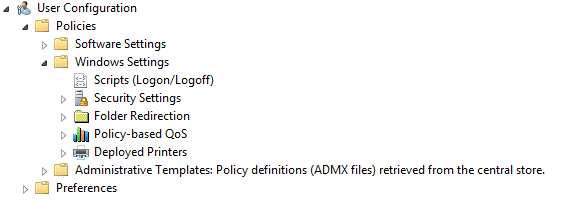
Holy Crap! It really is gone!
If IE Maintenance is missing, how can I edit settings like a homepage? The easy answer is – use a Windows 7 GPMC. The best answer is – use a Windows 7 GPMC to migrate those settings to Group Policy Preferences or Administrative Templates.
Continue reading