Back in July, we posted an in-depth guide on printer deployment with Group Policy Preferences. That article has generated a lot of questions about improving logon times, making management easier, and general best practices. Today, we are going to tackle each of those questions and establish some best practices for Group Policy Printer Preferences.
Note:If you still have a question after this, be sure to leave a comment and I will add it to this list!
Should I use Computer or User side printers?
Computer side printers when possible. These printers install on startup and will save your users a good bit of time when logging in. If your machines are set to automatically start before the work day begins, computer side printers will have zero impact on your users!
There are only two downsides to computer side printers:
- Setting a default printer is harder – we can sort of work around that though.
- Print queue management software (like Print Manager Plus) won’t be able to manage these printers.
If you do have to use user side printers and are worried about login times, read this now.
What should my CRUD method be?
Printers can be set to Create, Replace, Update, or Delete (CRUD). Once you have the printer perfectly configured (including any default printer options set), configure the printer action to Create. Visually, it is easy to remember that a “Green” printer is good to go!
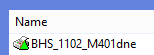
This printer’s green icon means it is set to create.