One project that consistently saves me time every day is my custom Active Directory Users and Computers MMC. This MMC contains quick links to commonly visited OUs and embedded scripts for fast access! But this custom MMC only saves me time if I update it to match my current work.
Because of a very large site migration, I found myself needing to duplicate group memberships very quickly. I was pulling a fireman and migrating group memberships manually. What I needed was an extendable but simple way to automate this. Once again, PowerShell came to the rescue! The script below makes duplicating group memberships with PowerShell a breeze!
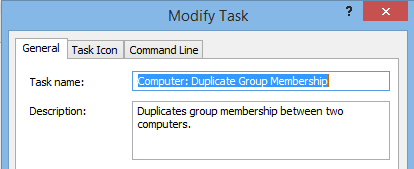
The custom AD task
This PowerShell script makes use of the Quest AD cmdlets. If you don’t have these cmdlets installed, you can download them from here. This script is designed to be completely standalone. Because of that, we start by adding our Quest tools and prompting for a source and a destination computer.
Add-PSSnapin Quest.ActiveRoles.ADManagement

$SourceComputer= read-host "What is the source computer? (This computer is in the groups already.)"
$DestinationComputer= read-host "What is the destination computer? (This computer needs to be added to groups.)"
$DestinationComputer = Get-QADComputer -Identity $DestinationComputer
Your source computer should be the computer that is already in the correct groups. Your destination computer is the machine that needs to be placed in the correct groups. This script is flexible enough to accept a DestinationComputer prefix. For example, typing GAMCN for the DestinationComputer will grab every computer that begins with that prefix! Continue reading