Don’t you hate it when you can’t find what you need? In our department, we share all of our scripts in a single folder. This folder had some serious organizational issues. Duplicate scripts, missing modules, random folders, etc. Finding that one script that you need doesn’t have to be hard! In this guide, we will create a PowerShell script store and learn an awesome trick to make content searching so much easier!
Organizing and Linking to Your PowerShell Script Store
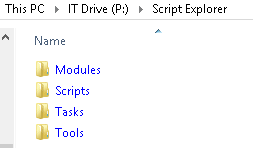
In the root of your current script folder, create four sub-folders named: Scripts, Modules, Tasks and Tools. If your root folder is named scripts, it may seem redundant to have a sub-folder with the same name but stay with me. Your structure should now look like this:
Start by populating your Modules folder with any custom PowerShell modules that you use. Our module store contains the MDT PowerShell CMDlets and several user made modules from the TechNet Script Gallery.