


This Friday (04/12/13), I am leading an hour long Lunch & Learn session going over the basics of PowerShell. A question I consistently see is, “I am new to PowerShell. What do I need to first?” Here are the two first things you should do:
Category Archives: Walkthrough
These posts, normally longer in length, completely walk through an entire technology or project.
Finding the Technical Needle in the Proverbial Haystack (Part 3)
Wrapping up our series on finding technical information quickly, we are going to explore the Group Policy Search service a little bit more. With over 3400 policy settings that can be configured in multiple ways, finding (and understanding) that perfect setting can be a challenge. Because you will likely be hunting these settings in Group Policy Management Console (GPMC), we are going to add a search option that links us back to the Group Policy Search service.
Finding the Technical Needle in the Proverbial Haystack (Part 2)
In Part 1 of our Haystack series, we looked at two ways to search TechNet and the Azure App, Group Policy Search. Today, we are going to cover a way to improve the Group Policy Search service and to make it accessible in Windows Explorer.
Finding the Technical Needle in the Proverbial Haystack (Part 1)
There is a plethora of information in Active Directory and Group Policy. Every new release of Server simply compounds this information. 9 times out of 10, everything you will ever need is on TechNet. Finding it is the problem. To make sense of this overload and to find exactly what I want when I need it, I use these two tricks.
Tracking Down Rouge CSEs: IE Maintenance GPO in Windows 8
“The time has come the Ballmer said to talk of many things. That IE Maintenance has to go and Blue will ship in Spring.”
Wait – what! IE Maintenance has to go? Come again Mr. Ballmer – did you just say it is already gone?
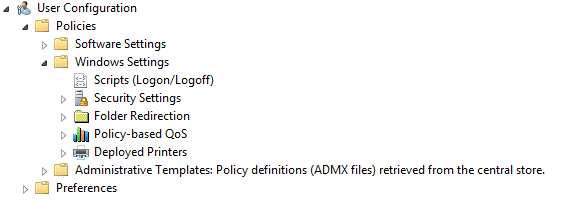
Holy Crap! It really is gone!
If IE Maintenance is missing, how can I edit settings like a homepage? The easy answer is – use a Windows 7 GPMC. The best answer is – use a Windows 7 GPMC to migrate those settings to Group Policy Preferences or Administrative Templates.
Continue reading