


Group Policy is an extremely flexible and complicated tool. One question I am asked quite a bit is, “Can you give me a list of settings I need to enable?” The short answer is No, Microsoft has already enabled the vast majority of things that should be enabled. And while Microsoft’s guidance may change over time (see Offline Files as an example of this), most settings stay the same. There is one setting, however, that is not enabled by default. If you are going to use Group Policy and want to make your troubleshooting life easier, you will want to enable it.
Category Archives: Best Practice
This category contains any best practices.
Find Out What Computer a User Logged Into Automatically
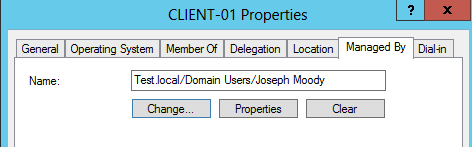
Stop asking “What Computer are You On”! Instead use Active Directory and Group Policy to search for you! In this post, we are going to set Active Directory to automatically record where users login. And when a user calls, Active Directory Users and Computers will let us instantly remote into their computer and will find out what computer a user logged into. In short, you will be able to click on any computer in your domain and see the current logged in user. All within Active Directory Users and Computers!
Restrict Users to Certain Computers
Limiting a user to certain logon workstations is a common administrative task. Doing this is a very repetitive if you have to restrict users to certain computers. Even at that, Microsoft limits you to only 64 workstations when you are entering them in using the GUI. Although you can add additional computers in the AD attribute editor, it is still a huge (comma separated) pain!
To understand the problem, we will do it manually once. Open the user’s properties, go to the Account tab then click “Log on To”. Then add each computer one at a time. It will not take wildcards.
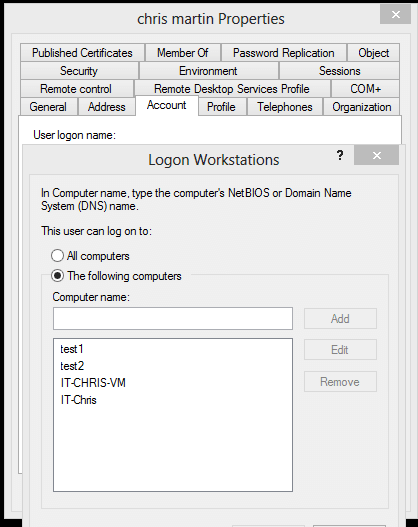
What if you could add a lab of computers just by typing the users name and computer name or prefix? What if you could add an entire site to a guest user automatically? Well you can using PowerShell! – you had to know that line was coming 🙂
Multiple Remote Desktop Sessions = A Happy Helpdesk
An update to this post (that covers Windows 10) is now available here.
You are checking the helpdesk and a new problem rolls in. You know the solution but you (the administrator) will need to login. You immediately remote into the machine only to see that the user is showing a presentation or actively using it.
Do you:
A) Call the user and have them log off so that you can start fixing the problem. The problem will get fixed but the user is interrupted for 20 minutes.
B) Wait until later in the day and hope the user isn’t using their computer. The problem will get fixed at the end of the day but the user had to deal with it all day.
C) Use RDP and log into the computer. The user is able to continue the presentation. You are able to fix the problem in the background. Everybody is happy!
The answer is C!
“That’s wrong!”, you say! “Client OSs can’t have concurrent RDP sessions. When you try, you get an ugly message and the current logged in user is logged out!”
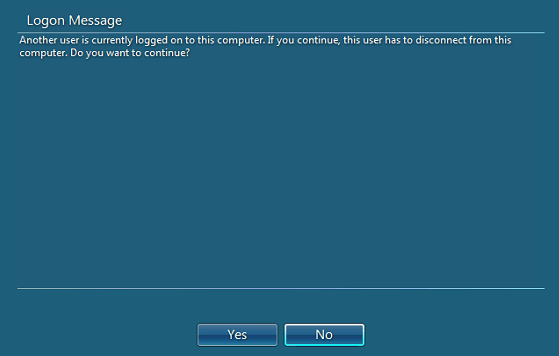
If Server can, the client can! All we have to do is trick it! How? Let’s find out! Continue reading
Top 5 Reasons Group Policy Software Installation Is Not Working
Group Policy Software Installation (GPSI) is an effective (and free) way to manage software deployment. After years of use, I have found these five common issues. Let’s walk through the top five issues and the solutions to a fix them! We will figure out why group policy software installation not working!