


Group Policy is an extremely flexible and complicated tool. One question I am asked quite a bit is, “Can you give me a list of settings I need to enable?” The short answer is No, Microsoft has already enabled the vast majority of things that should be enabled. And while Microsoft’s guidance may change over time (see Offline Files as an example of this), most settings stay the same. There is one setting, however, that is not enabled by default. If you are going to use Group Policy and want to make your troubleshooting life easier, you will want to enable it.
Category Archives: Group Policy
This category contains any Group Policy related posts.
Find Out What Computer a User Logged Into Automatically
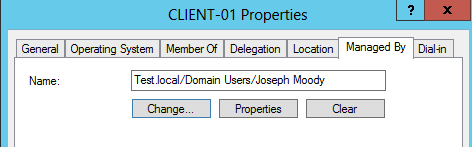
Stop asking “What Computer are You On”! Instead use Active Directory and Group Policy to search for you! In this post, we are going to set Active Directory to automatically record where users login. And when a user calls, Active Directory Users and Computers will let us instantly remote into their computer and will find out what computer a user logged into. In short, you will be able to click on any computer in your domain and see the current logged in user. All within Active Directory Users and Computers!
Block the Control Panel with Group Policy and PowerShell
Being able to block the Control Panel with Group Policy is quite easy, simply enable “Prohibit access to Control Panel”. Blocking certain control panel applets, like Sound, is harder! You would think that enabling “Hide specified Control Panel items” would do the trick – that is until you read the description for that setting.

So it isn’t as simple as entering in Volume to block the Volume and Sound applet. To make sure that we block the correct applet, let’s learn the incorrect and correct way for PowerShell to list our Control Panel canonical names.
(Re)Installing the Microsoft XPS Printer
In all of my brilliant wisdom, I thought it would be a wise idea to remove the Microsoft XPS Document Writer from all of my machines.

Why did I do this? Well – three years ago, I had a site that switched to Windows 7. A common complaint was that their default printer would sometimes change to the XPS document writer and the user didn’t know where that printer was located. It was useless to explain that it was a “fictional” printer so I did the logical thing and deleted the printer using Group Policy Preferences. Boy was I dumb! Until now, I thought I was stuck with that change.
Finding the Technical Needle in the Proverbial Haystack (Part 3)
Wrapping up our series on finding technical information quickly, we are going to explore the Group Policy Search service a little bit more. With over 3400 policy settings that can be configured in multiple ways, finding (and understanding) that perfect setting can be a challenge. Because you will likely be hunting these settings in Group Policy Management Console (GPMC), we are going to add a search option that links us back to the Group Policy Search service.