Have you ever spent time troubleshooting a problem only to discover that a computer or user wasn’t in the right security group? Shadow Groups (sometimes called dynamic security groups) can stop this problem! They work by automatically adding objects to a group based on a name, Organizational Unit, or another attribute. So get ready to embrace the dark side of Active Directory – we are about to set up some shadow security groups!
Continue readingAuthor Archives: Joseph Moody
Deploy Office 2013 with Group Policy – The Simple Way!
You would think that Microsoft would make it easy to deploy Office 2013 with Group Policy! Well, they don’t – at least not in a traditional sense. To quote Microsoft, “the setup architecture for Office 2013 uses multiple .msi files and the Office Setup program is an executable (.exe) file.” Smelling spin, I tried out Bing’s new Hidden Meaning Translator:
In this walk-through, we are going to deploy Office 2013 with Group Policy Scripts and try to retain a bit of our sanity. Here goes!
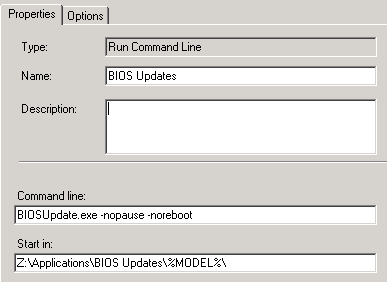
Updating BIOS Versions with MDT
Updating BIOS versions is best done while the machine is imaging. Fortunately for us, the Microsoft Deployment Toolkit (MDT) provides a built-in mechanism for updating BIOS versions. In this How-To guide, we are going to cover:
- Creating a central BIOS version repository
- Modifying your Task Sequence to install the BIOS Update
The examples shown are geared toward Dell machines. This layout should work for any Make and Model though. The only client requirements relate to the actual BIOS update file. It must initiate silently. If you are ready to get your BIOS updates under control, keep reading!
Continue reading
PowerShell Special: Inline .NET code Part 3
Today, we wrap up our final deep dive into PowerShell. For the past three weeks, we have been exploring the benefits of inline .NET code in your PowerShell scripts. These posts come from Manning Publications’ new book: PowerShell Deep Dives. Because I know you all are anxious to wrap up this series, here is part 3, .NET class with methods.

Deploy Java Runtime Environment with Group Policy
Note: As funny as this article is, it has since been replaced with the version linked here.
By the time you’ve finished reading this sentence, your version of Java will be two versions out of date! Joking aside, Java updates at least twice a month. If you want to stay on top of your updates or at least ease the software installation process, you will need to deploy the Java Runtime Environment (JRE) with Group Policy Software Installation (GPSI).
Unlike some deployments, such as Adobe Flash Player, deploying Java is a little more difficult. This is because Java has a tendency to fail if another older version was ever installed on the computer. Java also likes to have a firewall rule for certain applets (this step is optional though). Finally, you have to physically edit the MSI to remove the auto update feature. So grab yourself a nice cup of joe and prepare to deploy some Java!